
Get your password and full instructions sent by email or whatsApp in 10 minutes. Working hours - NY time-zone
Passwords will work 100% tested.
Our services are aimed to provide you:
•Dell BIOS password reset
•Dell laptop BIOS password reset
•Dell desktop BIOS password reset
•Dell BIOS password removal service
•Dell BIOS recovery service
•Dell computer password support
Turn on your Dell, on the password request screen, look for any error code or the 7 characters service tag, and suffix being the last 4 characters
Password Services by list: |
Supported Dell Strings Example: |
|---|---|
| Dell 8FC8 bios password reset. | 12345678-8FC8. |
| Dell CF1B bios password reset. | 12345678-CF1B. |
| Dell 3FE2 bios password reset. | 12345678-3FE2. |
| Dell 1B58 bios password reset. | 12345678-1B58. |
| Dell 9ABE bios password reset. | 12345678-9ABE. |
| Dell 0001 bios password reset. | 12345678-0001. |
| Dell AE60 bios password reset. | 12345678-AE60. |
| Dell Unlock key hint number password reset. | A426A639. |
| Dell Aptio bios password reset. | 3PKZ7R3. |
| Dell 3A5B bios password reset. | 1234567-3A5B. |
| Dell E7A8 System or Administrator password reset. | 1234567-E7A8. |
| Dell System Disable password reset. | F69747FD0C05B908. |
| Dell PPID bios password reset. | SERVICE TAG + PPID . |
| Dell HDD Password Error Code reset / generator. | 02145. |
| Dell Password from Service tag reset / generator. | CNK0PB2. |
| Dell Hard-drive S/N passwordreset / generator. | Service Tag + Hard Drive S/N. |
| Dell 1F66 bios passwordreset / generator. | 12345678-1F66. |
| Dell 6FF1 bios password reset. | 12345678-6FF1. |
| Dell BF97 bios password reset. | 12345678-BF97. |
| Dell 1D3B bios password reset. | 12345678-1D3B. |
| Dell 1F5A bios password reset. | 12345678-1F5A. |
| Dell 2A7B bios password reset. | 12345678-2A7B. |
| Dell 595B bios password reset. | 12345678-595B. |
| Dell A95B bios password reset. | 12345678-A95B. |
| Dell D35B bios password reset. | 12345678-D35B. |
| Dell System disabled bios password reset. | 12345. |
First get a Dell Bios password reset code here, now access the BIOS setup
(usually by pressing F12 during startup) and navigate to "System Security".
Then, select "System Password", enter the OLD password (if prompted), and leave the new password field empty.
Save the changes and the computer will restart with the password disabled.
Detailed Steps:
Enter BIOS Setup: Immediately after turning on the computer or restarting, press the F12 key repeatedly to access the BIOS setup.
Navigate to System Security: Locate and select "System Security" or a similar option within the BIOS setup.
System Password: Select "System Password".
Enter Current Password: If prompted, enter the current system password.
Leave New Password Blank: Leave the "New Password" field empty. Save Changes: Press "Save" or "Exit" to save the changes and exit the BIOS setup.
Restart Computer: The computer will restart, and the system password will be disabled.
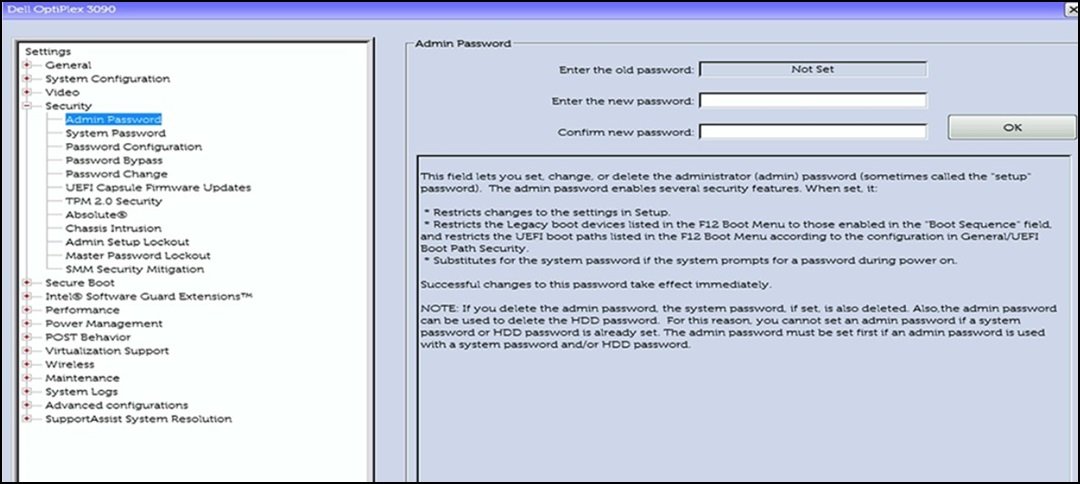
Detailed Steps:
Enter BIOS Setup: Immediately after turning on the computer or restarting, press the F12 key repeatedly to access the BIOS setup.
Navigate to System Security: Locate and select "System Security" or a similar option within the BIOS setup.
System Password: Select "System Password".
Enter Current Password: If prompted, enter the current system password.
Leave New Password Blank: Leave the "New Password" field empty.
Save Changes: Press "Save" or "Exit" to save the changes and exit the BIOS setup.
Restart Computer: The computer will restart, and the system password will be disabled.